
💻💻Best Laptop For Blogging: Reviews of 9 Prominent Bloggers


Blogging without a Laptop seems quite impossible. Though you can surely Blog from a Mobile phone or a Tablet too, but it is little bit problematic.

Many a times, you have to copy some code and then paste it in some other tab or sometimes you need to compress an image and upload it to your website or do some other tasks related to Blogging. 

Doing, All this becomes little tough from a mobile phone. 

Hence getting a good Laptop device or a good Desktop PC is surely recommended for every Blogger. 

Laptops are though most times preferred over Desktops just because working with a Laptop gives you independence to change your position as you can move from one place to other easily.

Selecting a good Laptop device becomes very necessary for Bloggers. This is because, a Laptop is the major instrument for a Blogger and we Bloggers use it whole day.


While Selecting a good Laptop, we have to look for Laptops which offers good speed and performance, have good battery life, are durable, offer good screen quality, processor, have comfortable keyboard, provides enough storage, have a pocket friendly price, good hardware specifications and consider a heck lot of other factors.

Hence, selecting a good Laptop sometimes becomes a little uneasy task. 

This is the reason we tried to find out the solution to this problem. 


Best Laptop For Blogging
💻💻Best Laptop For Blogging

We contacted some prominent Bloggers and asked them questions like Which Laptop they are using for Blogging, Are they satisfied with the performance of their present Laptop, Which Laptop is best for Bloggers in their opinion, Do they recommend that Laptop to other fellow Bloggers and some other related queries.

We also made some popular freelancers and Internet professionals participate in this survey.

The responses we got from these famous Bloggers are really helpful and can help you select a good Laptop for Blogging or any other job you do.

I have quoted these responses below and taking reference of these unbiased reviews you can choose a good Laptop for Blogging or any other Internet job you do.


Best Laptop For BloggingReviews of 9 Prominent Bloggers and Internet Professionals


1. Akshay Hallur (Admin:- GoBloggingTips.com)

Akshay is a professional Blogger and a Digital Marketer who writes about Digital Marketing and its related domains.

When I asked him about the device he uses for Blogging, Akshay told that he uses Apple Macbook Air and iMac 27' for Blogging and his other virtual activities.

He is satisfied and happy with the performance of both these devices. 

He quotes that, 

"You may be thinking that I'm an Apple fanboy. Nopes. I don't like iPhones, Infact I switched back to Android from iOS. Androids are the best. But when it comes to PC, Mac is the best and leaps and bounds ahead of Windows when it comes to UI/UX. If you are serious about Blogging and if you can afford always go for Mac machines. They are powerful, and pleasure to work on"
Akshay added, "Beware, before going towards Mac because If you go you will love it and will never switch back.

Hence, As per Akshay, Macbook Air which gives him 12 hours battery backup is the Best laptop for Blogging.


2. Marko Saric (HowToMakeMyBlog.com)

Marko is a popular Blogger, Marketer and an amazing writer. He uses Macbook for Blogging and his other Internet jobs.

Marko quoted,
"I like Macbooks and You can totally rely on them unlike Windows."
He added that he is totally satisfied with performance of his device and he strongly recommends Macbook to other inspiring Bloggers and Internet professionals.


3. Sajjad Shahid (Cloudways.com)

Sajjad works as Ecommerce community manager with Cloudways, the popular managed hosting platform.

A well known name to many involved in Ecommerce field, Sajjad Shahid uses a Lenovo Ideapad 110 laptop for managing his day-to-day Internet activities.

He says that he is totally satisfied with performance of this Laptop and he strongly recommends it to others. He quoted,
"I believe the best laptop for Blogging does not have to be expensive or cheap but it must be comfortable enough for you to produce and complete a blog."

4. Adarsh Verma (FossBytes.com)

Adarsh Verma is Cofounder of FossBytes. FossBytes receives more than 3 million monthly pageviews and is one of the fastest growing Tech media startups of India.

Adarsh told me that, He uses Macbook Air for his day to day jobs at Internet.


He added that he is totally satisfied with Performance of Macbook Air and strongly recommends it to other growing Bloggers and Internet professionals.


5. Dr. Amrita Basu (HealthWealthBridge.com)

Doctor Amrita Basu is a popular Indian Lifestyle Blogger. You can see her articles trending at IndiBlogger many times.

She is using HP i5 Notebook from the last two years and is totally satisfied with performance of her device.

She says that this device is a great value for money and it has made her vlogging journey easier.

Doctor added that,

"A good laptop makes the writing and Blogging journey more easier. Amrita told that She has experience of Blogging from a mobile phone too. She suggests that those who cannot afford a Laptop yet, can start Blogging from a mobile phone. She also suggested that Taking care of your electronic device is side by side also very important. She has a two year old daughter who loves to sit on the keyboard of her Laptop." 😊😊

6. Hitesh Bhasin (Marketing91.com)

Hitesh Bhasin is Admin of Marketing91. Marketing91 is one of the most popular Blog among MBA students.

Hitesh uses Macbook Air for Blogging and he is very satisfied with the performance of his device.

He strongly recommends Macbook Air to other fellow Bloggers and also adds that the tools you use side by side are equally important in growing your Blog as your Laptop.


7. Akshat Verma (AkshatBlog.com)

Akshat is a popular Indian technology Blogger and owns many popular Technology websites.

He uses Fujitsu Lifebook AH532 for Blogging purposes and says that he is highly satisfied with its performance and recommends it to everyone who is looking for a budget Laptop.

He added that,

"I only use this Laptop for small day-to-day tasks like Checking mails, browsing Internet or use it while travelling. He owns a personal computer as well and uses it for major tasks like Blogging and content creation."

8. Sujoy Dhar (WideInfo.org)

Sujoy is an expert in Cpanel Server Administration, Wordpress and Search Engine Optimization. He is also the Admin of WideInfo.org a popular Indian Blog.

Sujoy uses Apple Macbook Pro for Blogging and his other Internet jobs. He says that he is totally satisfied with his Laptop and highly recommends it to other aspiring Bloggers and Internet professionals.

9. Pulkit Sharma (Bank-Info.in)

A CA by profession, Pulkit sharma runs many websites related to Banking, GST and related topics. Some of his sites receive half million views/month and are growing continuously.

Pulkit also uses Macbook air for Blogging. He says that,

"I am highly satisfied with performance of Apple Macbook air and I highly recommend it to other Bloggers. Its one of the Best things a Blogger can have."


💻Conclusion: 5 Best Laptops For Blogging💻


1. Apple Macbook Air

Apple Macbook Air can be labelled as the Best Laptop for Blogging. Its 10-12 hours battery backup is one main thing that appeals to most of the Bloggers.

It comes with an Intel core i5 processor which can be credited for its fast better performance.

Macbook Air comes under a 13 inch variant only. Both 128 and 256 GB SSD variants are made available though.

It is little bit costly though but comes with a warranty of 1 year. Here is a detailed review video which you can consider viewing before buying:-


(If you do not want to watch this and just want to buy your Macbook air, you can get it here >>> Buy Apple Macbook Air)


2. HP i5 Notebook

HP i5 notebook can be ranked at second position in this list. It is a cost effective best Laptop for Bloggers and Internet professionals especially who prefer using Windows.

If you need a pocket friendly device, you can buy HP i5 Notebook. The only problem with it is of battery backup.

It also comes with an Intel core i5 processor, 15.6 inch screen and 1 TB Hard disk size.

Laptop is quite heavy as compared to Macbook. Still you will not face any issue with it.

Warranty of the laptop can be extended to 2 years by paying some additional amount.

You can buy it here >>> HP i5 Notebook


3. Lenovo Ideapad 110


If you want to save some more bucks, investing in a Lenovo Ideapad 110 or in a HP i3 notebook is recommended. 

HP i3 notebook works like a charm. The only problem you get with HP is the poor battery life. It is just a smaller variant of HP i5 notebook as it has i3 processor.

Other specifications are mostly same. Obviously i3 notebook is cheaper than i5.

I have personally used it and I have faced not a single issue with it in the last two years.

Lenovo on the other hand has really positive reviews and it is the best pocket friendly solution and even cheaper than HP i3 notebook.

You can buy it here:- Lenovo Ideapad 110 

It is highly recommended for those who are low at budget and want to get the best laptop in minimum pricing.

Hence,

ConclusionsPrice
Best Pocket Friendly Laptop For BloggingHP i5 Notebook
Cheapest Best Laptop For BloggingLenovo Ideapad 110
Best Laptop For Blogging (Budget No Bars)Macbook Air

Please, keep in mind that all these reviews are unbiased, unpaid and the listings are made neither to benefit nor to harm the reputation and sales of any brand.

We hope that After reading these reviews, you can surely make your selection and select a good laptop for Blogging.

Comment down below and Let us know which device you bought and which you are currently using with its proper reviews.

You can appreciate my efforts by sharing this content at various social platforms.

Also, Do not forget to subscribe us below:-

Subscribe to our mailing list

* indicates required


How to Insert Nofollow Tag in Wordpress and Blogspot?


Links plays a major role in Search Engine Optimization (SEO). If you know a little bit about SEO, you must have encountered with terms  like Dofollow Links and Nofollow Links.


For a complete Newbie, terms like Inbound links, Outbound links, Dofollow attribute, Nofollow attribute etc. can be bit confusing.

Assuming that majority of the people reading this post are beginners we will give you a brief Introduction about Dofollow and Nofollow links in this tutorial.


Later we will take our conversation one step ahead and we will discuss How to Insert Nofollow Tag in Wordpress and Blogspot. 


So Let us dive into the discussion:-

Inbound and Outbound links: A Brief Overview


Stats says that there are more than a billion websites which are currently active on the Internet. If you are a frequent Internet user, I am sure you will be encountering with hundreds of different websites daily.

For e.g. A student who takes frequent help of Internet for his studies must have seen thousands of websites on Educational niche.


In same way, there are thousands of websites active on other topics like Health, Marketing, Technology, Fashion, Books and other topics.

But when we turn towards search engines like Google for getting answers for a particular query or question, only a limited number of websites appear at the first page of search results.

For e.g. Suppose, I visit Google and search for How to make a website. Now though many websites have written good content over this topic but only a few are at first page of Google.

Even on the first page, some websites are placed higher than the others. Now there are some questions that will naturally arise in every Newbie's mind. You would be wondering:-

On What basis some websites are Ranked higher in the Search Results and some Are Ranked Lower? Why not the websites at First Page are at second page of search results and website at Second Page are at the first page?

The answers to these questions are very simple but if you will try to explore reasons of those answers you will see that there is nothing more complex than this.

Actually, Search Engines have designed some algorithms with the help of which they rank websites in their search results. These search engines never actually tell How their algorithms actually work.

SEO professionals spend their whole time decoding these algorithms. It is believed by majority of Search Engine Professionals that Backlinks (A synonym for the term Inbound Links) are among top ranking factors on which algorithms of search engines are based.


The more number of quality and quantity of backlinks a website have the better it will rank in search results.

Apart from Backlinks, factors like website's loading speed, content present at the website and other things are added to the list of ranking factors.


Now, Let us look in detail what Actually these Backlinks (Inbound links) are:-

Suppose you have a website A and your friend has a website B. Now if your friend has placed a link of your website A at his website B, then this link will be considered as a backlink for your site A.

Now suppose an opposite scenario. 

Again Let us consider that you run a website A and your friend run a website B. Now if you place link of your friend's website B at your website A, then that will be act as a backlink for your friend's website.

This means:
Links which points to a particular website are called Backlinks for that website. Inbound links is other term used for Backlinks.

The more quality backlinks you have pointing towards your website, the better you perform in search engine results.

Apart from Inbound links, there is one other term which you need to understand and that is Outbound links.

It has exactly opposite meaning as that of Inbound links. These are the links which points from one website to some other website.

For e.g. If you run a website A and your friend run a website B and then you have given a link to your friend's website at your website, then that link will be a outbound link for your website and Inbound link for your friend's website.

As simple as that...

Its always suggest to link to revelant high quality websites only. This means your website must have outbound links pointing to quality sites only.

If your website will have poor quality outbound links, pointing towards spamy or adult websites it will effect your performance in Search Engine Result Pages (SERPs)

Now After understanding Outbound and Inbound Links, it becomes crucially important to understand Dofollow and Nofollow Links.


So Let us learn about them now:-


What are Dofollow and Nofollow Links:-


Nofollow attribute is basically associated with links. The links with which Nofollow attribute is added in html are termed as Nofollow links.

Please note, there is nothing like Dofollow attribute. All the links are dofollow by default. Hence you do not need to add any attribute to make a link dollow.

Basically, Nofollow attribute is introduced for webmasters. As we discussed above: Links pointing out from a website are outbound links of that website and Links pointing towards a website are Inbound links or backlinks for that particular site

The thing you need to understand here is when you link to a particular website, you are actually passing them link juice. This link juice helps that website gain better rankings in search results.

Also when you are linking to a website, search engines consider that your website is relevant or related to your website.

This means if you are linking to some website both its search engine rankings and your search engines rankings will be influenced by it.

Now, In many cases this happens that you need to link to a particular website for some reasons. May be you are an affiliate for them and you are promoting their website for some reasons or may be you are just putting the link of that website for some particular credits or for any particular example.

Hence, whatever may be the reason In some cases you just want to link to a particular site but neither you want to pass them link juice nor you want that search engines consider its related/relevant to your website.

In all those cases, you can add a nofollow tag to that link. Its always a better practice to give nofollow links to spamy sites and low quality websites.


How to make a Link Nofollow in Blogspot (Blogger):-


Making a link Nofollow is very simple. In Blogspot, there are total of two methods which can be used to make a link Nofollow. We have listed both of them below:-

Method 1: Making Nofollow Links In Blogspot


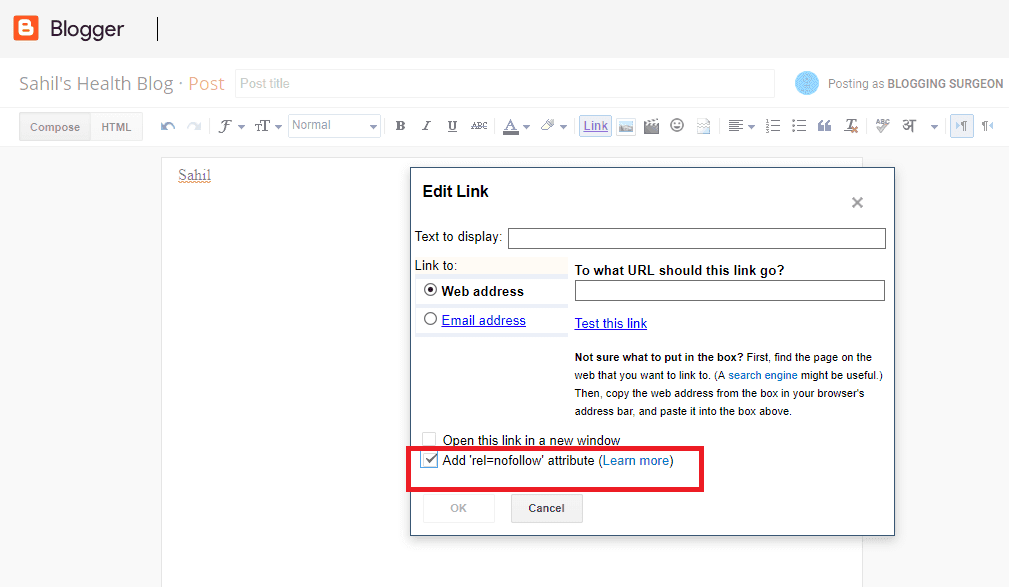
This method is very simple. When we add the link in Blogspot editor, you just need to check the box where Add 'rel=nofollow' attribute is written and it will do your job.


You can refer to the image for reference:-


Add Nofollow Attribute in Blogspot (Blogger)


Method 2: Making No Follow Links In Blogspot

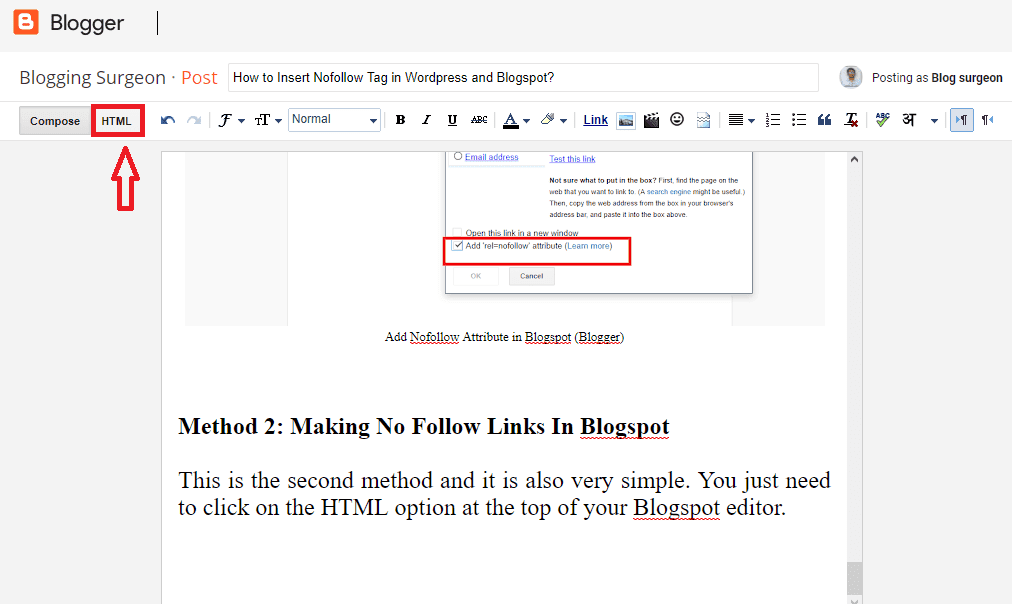
This is the second method and it is also very simple. You just need to click on the HTML option at the top of your Blogspot editor. (Refer to the image below)


Add Nofollow Attribute in Blogspot (Blogger)
It will open up the html code of the content. There you need to search for the link you need to make nofollow. Once you find it you can associate rel= "nofollow" attribute with it and click on the save button.

That's it. Otherwise first method is easy and more handy than second one.

How to make a Link Nofollow in Wordpress:-

Alike Blogspot there are similar methods following which a link can be made no follow in Wordpress as well.

We will again discuss two methods to make links No Follow in Wordpress. 

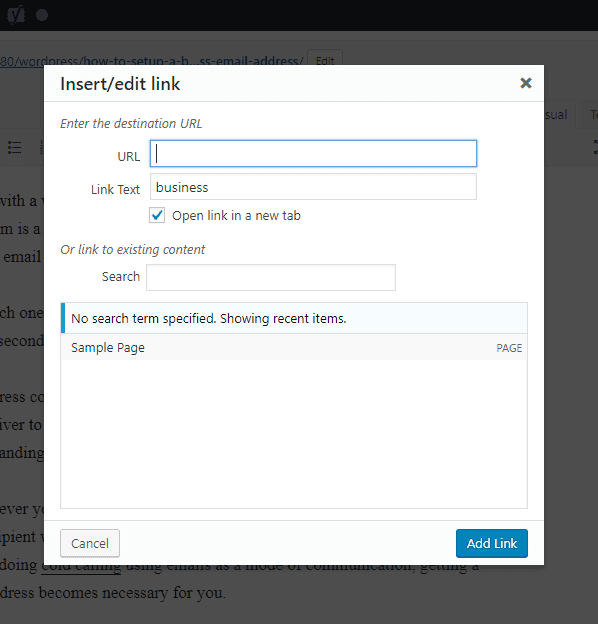
Alike Blogspot, there is no direct way to add nofollow attribute to the links. Hence by default, the link inserter option of Wordpress looks something like this:-

No Option to add Nofollow Attribute in Wordpress

Hence as you can see there is no direct option like Blogspot to add Nofollow attributes.

But there are plugins which can help you gain this functionality easily. So Let us see How you can Insert Nofollow Tag in Wordpress easily:-


Method 1: Making No Follow Links In Wordpress

This method can help you achieve an option like Blogspot with which you can add Nofollow attribute to any link with a single click.

For that all you need to do is install the plugin: Ultimate Nofollow and activate the plugin.

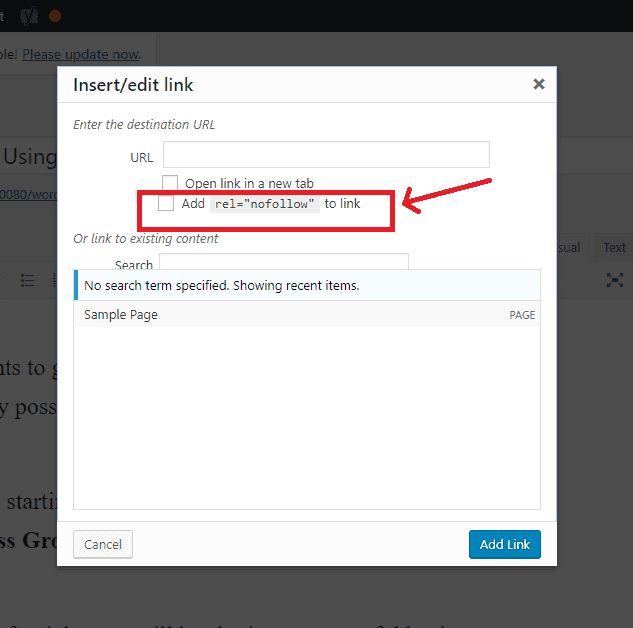
Once you install the plugin, the link inserter option will start looking something like this:

Ultimate Nofollow Plugin- Add Nofollow Attribute in Wordpress

As you can clearly see, the direct option to add Nofollow attribute is available now.

This is one of the most handy options to add Nofollow attributes, but we think you should use the second method instead of first one to make links nofollow in Wordpress.

The reason behind this is you should prevent the use of plugins where ever possible. Use of unnecessary plugins effects your page load time and Hence influencing your website's speed.

So Let us look at the second method to add nofollow attributes in Wordpress.


Method 2: Making No Follow Links In Wordpress

This is simple and a lot similar to second method which I mentioned in the section: Making No Follow Links in Blogspot.

All you need to do is open the text section from the wordpress editor where you write the content.


It will show up all the html. Now, you can find out the link which you want to make nofollow and add rel="nofollow" attribute to it.


That's it. This is surely a better method than Method 1 especially for those who do not insert much outbound links in their content.


Let us know which method works out the best for you through the comments section. 


We hope you enjoyed reading this content. You can subscribe to us for reading more such awesome write ups.


Subscribe to our mailing list

* indicates required


Best Blogspot Templates For Affiliate Websites

Blogger is still one of the most used platforms for Blogging and website building. 

Instead of buying a poor hosting, which remains down many times a month you should use Blogspot for building your website. It can handle very good amount of traffic easily.

Moreover working with Blogger is easy as compared to many other platforms.


If you are planning to build an Affiliate Niche website (Basically Amazon Niche website) at Blogspot, then this post is a must read for you because we are going to discuss about the Top 5 Best Blogspot Templates which you can use for building and running your Affiliate site.

Actually, while selecting a theme for you Affiliate site, there are a lot of features and functanolities you need to consider. Some of the major things you need to consider includes:

Signs of a Good Blogspot Theme For an Affiliate Site

1. A good responsive theme which loads properly at Both Mobiles and Desktop:  Optimizing the website, for a good desktop view is the first thing you always need to do. 

Second priority should be optimizing the theme for the most used mobile devices in your target country. For example, If United States of America is my target country, then after optimizing my website for desktop, I will optimize it for a good view on iPhone as iPhones are most used devices in USA.


Later on I will optimize site for other devices. 


2. Selection of a clean light weight template is crucial: A light weight template which does not takes much time to load is also a necessity.

This is because site load time is an important ranking factor these days. Hence a good light weight template helps you achieve good on-page SEO.


3. Make sure the theme is visually appealing: The theme which you are going to use for your Affiliate website should be visually appealing. 

It should display medium size featured images and if possible a slider in the Top of the theme will be really useful.


4. Themes with Two Top Headers converts much better: A theme with two top menus converts much better than themes with a single menu.

You can use one menu to add pages like About us, Contact us and Disclaimer pages and other menu to add categories of your content and related pages.

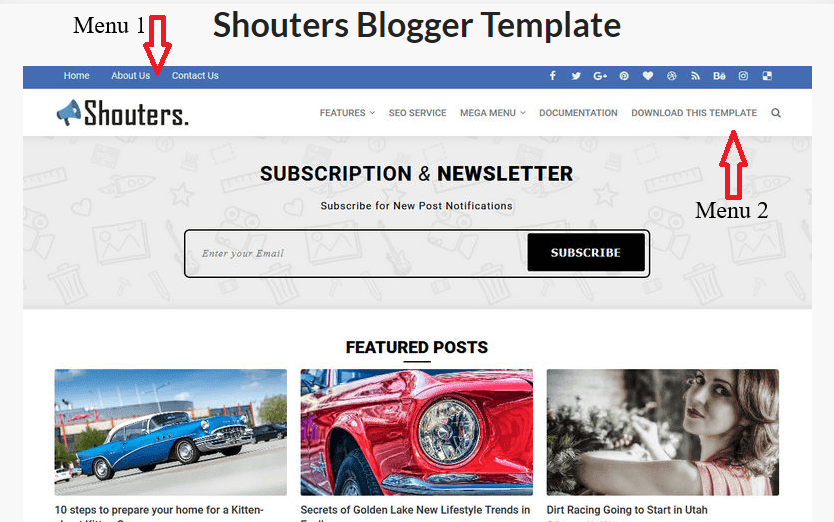
Here is an example of a theme with two menus. (Menu 1 and Menu 2 are labelled for reference in the below image)


Double Menu Blogger Template


In this post, we will consider all those themes which have all these features. They are responsive, mobile friendly and are visually appealing light weight themes.


Best Blogspot Themes For Affiliate Websites


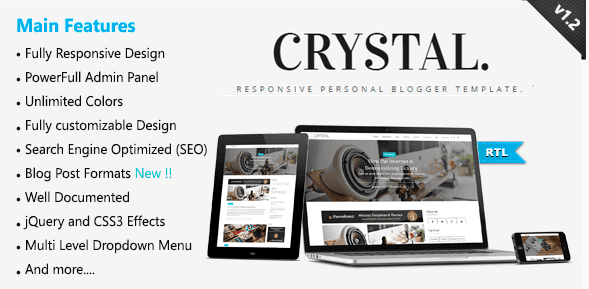
# Crystal Blogger Template : It is a clean and beautiful optimized theme. If we consider the point of visual appearance, this theme can be rated 5 out of 5 stars.

If you make use of a CDN and optimize your images properly, you can easily achieve a good speed with this template. Some top functionalities available in this theme are:

  • Social followers counter available.
  • Social share buttons below articles below are available.
  • Author box and Go to Top button are integrated within the theme.
  • Customization is easy. Beautiful drop down menus available.
  • Wordpress version is also available. So If you plan to move to wordpress in near future, you can keep the same looks of your website.
  • Ads ready, Responsive and SEO optimized Blogger theme.

Apart from all these functionalities there are a lot of other features made available by the author.

Crystal Blogger Template For Affiliate website
                                                        Download Now


If you are planning to launch an Affiliate website, you should consider looking at this theme once.

Though it is a paid template for Blogspot but its worth trying: Get Crystal Blogger Template


# Shouters theme for Blogger: This is a free Blogspot template (paid version also available) which you can use for your Affiliate niche website

It has two top menus, an Email subscribe option integrated in the top, easy to customize layout and a lot of other functionalities.


This template does not has an author box below the articles but the option of a customized author box in the footer is provided. 


Otherwise, this theme converts really well for the Affiliate sites. Here are the major functionalities available in this Blogger template:


  • Fast loading and properly SEO optimized
  • If you remove the featured posts option, the theme looks amazing at all Mobile devices.
  • Email subscribe button
  • Three different columns in the footer.
  • Go-to-top button is already integrated in this template.
  • Adsense optimized

Shouters Blogspot Template For Affiliate website
                                                          Download Now

Though free version of this template is available but you can not remove credits from the footer if you use this template.


In order to remove credits, you need to purchase this template. 


** There is one major problem that I felt with this template and that is the top Email subscribe button. If you do not want to make use of the RSS feed, it is pretty useless.


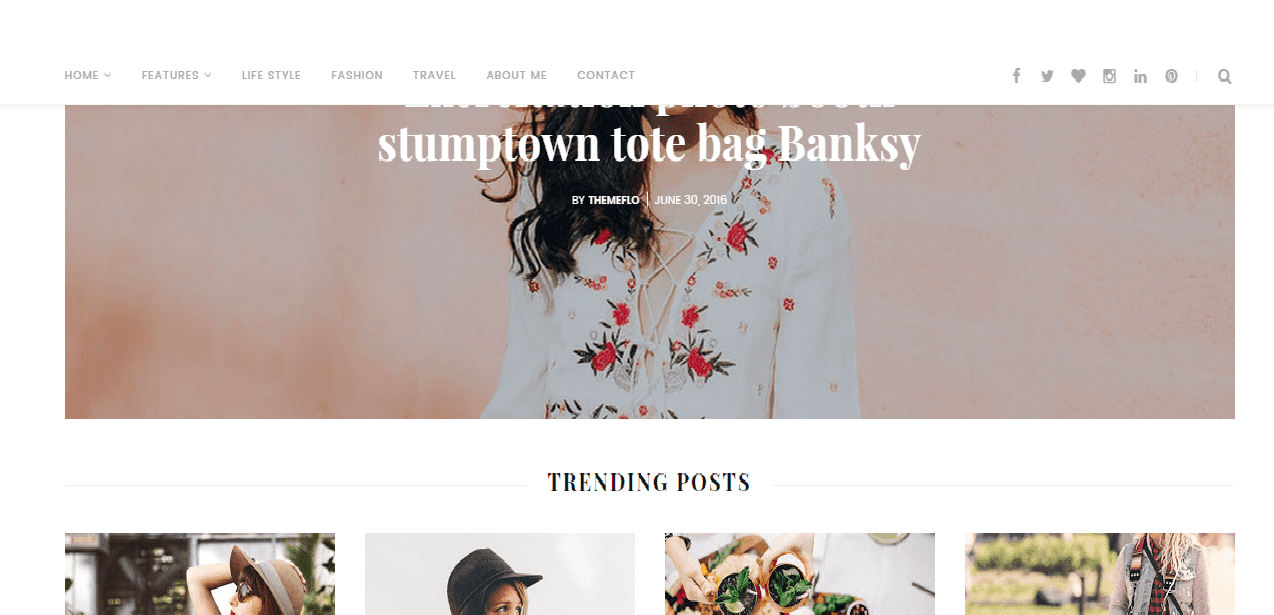
# Sunrise and Sunset Blogger Template : With proper customizations this template can be made of great use for an Affiliate niche website.

This themes comes with a slider, responsive and clean design. This theme can be made to load in seconds due to its design. Desktop view is heck converting for Affiliate sites.

Integrated author box, you might also like option for showing related posts, useful shortcodes, multi dropdown column and share buttons are available within the template.

Here are the top functionalities of this Blogspot template
  • Responsive and SEO optimized
  • Easy to customize theme
  • Instagram widget available at the bottom to show your Instagram posts (Personally I donot recommended to use it for Affiliate sites)
  • Custom contact page.
  • Top slider and Image thumbnails makes the theme visually appealing

Blogspot Affiliate Theme- Sunrise
Sunrise Blogger Template For Affiliate Website
                                                        Download Now


This is a paid Blogspot theme for Affiliate websites. It convert well for sites based on niches like Fashion, Fashion accessories, Pets etc. Here is the link from where you can get this template: Get Sunrise Blogspot Template


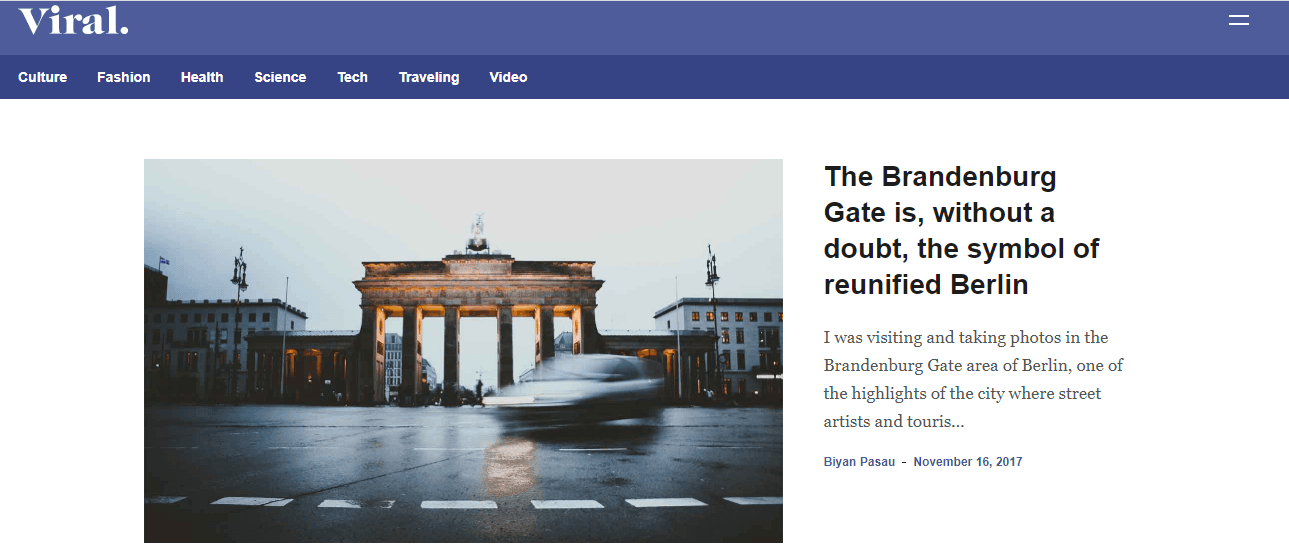
# Viral Magazine Blogger Template : A very neat and clean design, less page loading time and less page size makes this template perfect for your Affiliate website as you can achieve do good On-page-SEO with this template.

Related posts widget, featured posts widget and other features of this theme makes it suitable for websites with huge number of articles.

If you are planning to launch a website where you plan to post good amount of articles, you must consider this theme once. Here are the other top functionalities on this template:
  • Clean look and responsive.
  • Template converts well for mobile users
  • Adsense optimized spaces.
  • Smart customization and contact form ready template

Viral Blogger Template for Blogspot Affiliate website


Viral Blogger Template for Blogspot Affiliate website


                                                        Download Now


The only thing I disliked is the sidebar in the desktop view is similar to Free Blogspot templates. You need to do proper tweaks to make it look professional.

Here is the link from where you can get this template: Viral Blogger Template For Blogspot Affiliate websites.


Note: We have tested all these templates at Iphone 5, HTC one and Google Nexus 7 by making the use of MobileTest.me


If we found some more templates, we will update this list in the future. Till that you can subscribe to our Blog for receiving Email updates and notifications about our new Blog posts


Subscribe to our mailing list

* indicates required